Setting Up Kidblogs For Your Classroom
1. Why should you start blogging in your classroom? Take a look at what other educators have to say:
2. Kidblog is a simple blogging platform for students . It is accessible through the web or through the Kidblog app.
3. Take a look at a few examples of how students are using blogging in the classroom.
4. Go to Kidblog.org and create an account.
5. Add users to the account.
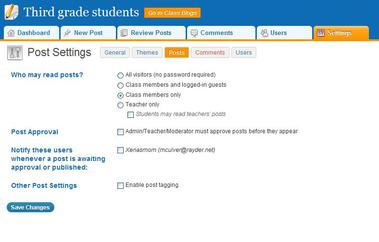
6. Review your settings in the control panel. Make sure to check the box if you would like to moderate posts and
comments before going on the blog.
2. Kidblog is a simple blogging platform for students . It is accessible through the web or through the Kidblog app.
3. Take a look at a few examples of how students are using blogging in the classroom.
4. Go to Kidblog.org and create an account.
5. Add users to the account.
6. Review your settings in the control panel. Make sure to check the box if you would like to moderate posts and
comments before going on the blog.
7. Learn about all the features of Kidblog through this Tutorial below.
Kidblog ppt from vpbast